Getting my home network's security logs into one place
New here? Start here for what my homelab is and how this site is organized.
My home gateway has an intrusion prevention system (IPS), but I almost never looked at it. Reading its alerts meant clicking through the UniFi app and exporting CSV files. The logs also don’t stay on the gateway for long.
What I wanted was simple:
- an email as soon as the IPS sees something
- a month of history I can search
- the gateway’s events and my server’s logs in the same place
I looked at full security platforms like Wazuh and Graylog. They need a lot of memory and are made for companies with hundreds of machines. I already had Grafana running on my Linux server for monitoring, so I added logs to it instead.
How it works
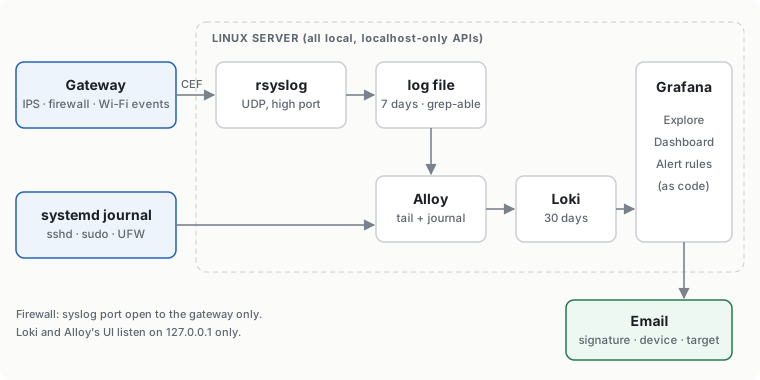
The gateway has a “SIEM server” setting that sends its events over syslog. On the server:
- rsyslog receives them and writes them to a plain log file. It’s already on every Linux server, and it doesn’t mind that the gateway’s format isn’t quite standard.
- Grafana Alloy reads that file plus the server’s own journal and sends everything to Loki.
- Loki stores the logs for 30 days. It only listens on the server itself.
- Grafana is where I search, look at a dashboard, and get the alert emails.
The firewall only accepts the syslog traffic from the gateway. Loki and Alloy together use about 450 MB of RAM.
The first surprise
I expected to see every connection in the logs. I didn’t. The gateway only sends events: a device joined the Wi-Fi, a setting changed, the IPS blocked something. At a quiet hour I got one line in five minutes.
The events have more detail than I thought, though. The IPS ones include the signature name, the device, the destination and the risk level. The Wi-Fi ones even include signal strength, which turned out to be handy for figuring out where my Wi-Fi is weak.
Testing the IPS alert
I didn’t want to wait for a real attack to find out if the alert worked. There’s a well-known test site for this:
curl http://testmyids.com
It returns text that looks like a server leaking its root account. That matches a standard IDS signature, and the gateway flagged it right away. A few seconds later the event was in Loki, and about a minute after that I had the email.
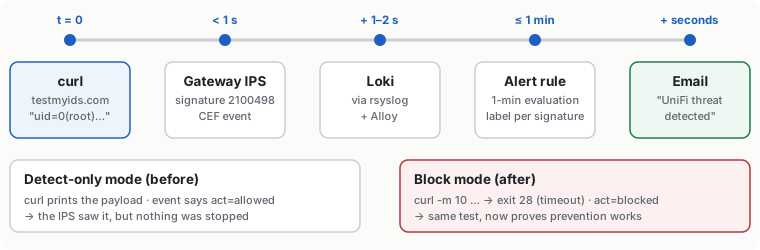
The log line also showed something I hadn’t noticed: act=allowed. My IPS was only detecting things, not blocking them. I switched it to block mode, ran the same test, and this time the request timed out and the email said “blocked”.
What showed up on the first day
A few things came in quickly:
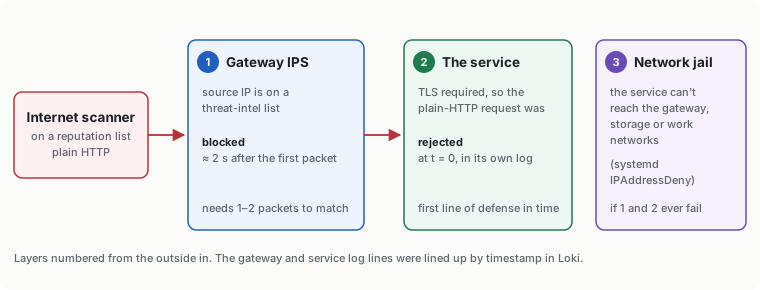
- Two scanners from the internet tried the one service I expose. The service refused the first one because it only accepts encrypted connections. The IPS blocked the second one two seconds after it started.
- A laptop at home tried to open the gateway’s admin page. My firewall only allows three admin devices, so it was blocked. It was network discovery software, not an attack.
- Most of the blocked traffic on my server came from a TV streaming device. It was just answering “who’s out there?” requests that my own server kept sending.
Things I got wrong
- I set an alert for “no logs for 30 minutes”. It went off the first quiet morning, because with events only, silence is normal. I changed it to 24 hours.
- One dashboard chart grouped traffic by port and hit Loki’s limit, because every random port became its own line. I limited it to normal service ports.
- Grafana logs every query it runs, including my searches for “Failed password”. That made my failed-login counter count itself. I excluded Grafana’s own logs.
Where it is now
I have one dashboard for security events, Wi-Fi activity and the server’s logs, and four alerts: IPS hit, unusual gateway event, logs stopped, and gateway memory high. It took a morning to build. The next step was writing my own detection rules on top of this data, which is the next post.