Writing my own detection rules at home
In my last post I sent my gateway and server logs to Grafana Loki and set up an email for every IPS alert. That works, but the IPS only knows what it has signatures for. I wanted alerts for things that are specific to my house:
- a device I’ve never seen before joins the network
- something tries to log in to the router’s admin page
- someone changes a network setting in the middle of the night
- a machine on my network starts scanning my server
None of that needs special tools. It’s all in the logs already. You just have to write the query and decide what “unusual” means.
The rules
I ended up with seven:
| Rule | What it catches |
|---|---|
| DE-001 | A new device on the network |
| DE-002 | A device that isn’t mine trying the router’s admin page |
| DE-003 | Network settings changed at night |
| DE-004 | An SSH login to the server from somewhere new |
| DE-005 | Someone scanning the server’s ports |
| DE-006 | The same device tripping the IPS again and again |
| DE-007 | sudo used in an unusual way (wrong password, another user, no terminal) |
Each one is a Grafana alert that emails me. For each rule I also wrote a short note: what it looks at, how to test it, what can set it off by mistake, and what to check when it fires.
I mapped them to MITRE ATT&CK. That sounds like overkill for a house, but it’s useful: you see quickly what you cover and what you don’t.
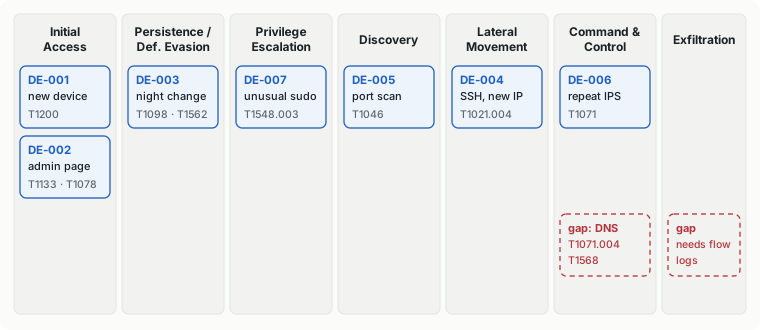
The red boxes are the gaps. Nothing looks at DNS, because DNS queries aren’t in my logs yet. That’s the next thing to add.
“Never seen before”
Two of the rules need the same idea: alert when something shows up that wasn’t there in the last 30 days. In Loki you can compare two time windows and keep only what’s new:
(devices that connected in the last 10 minutes)
unless
(devices that connected in the 30 days before that)
The first time I ran it, it flagged my own tablet. It had switched to a different MAC address, so the network saw it as a new device, and it had lost the fixed IP my firewall rules expect. I wouldn’t have noticed otherwise.
Picking a threshold
For the port-scan rule I had to choose a number. Before guessing, I looked at two days of firewall logs. No device on my network had hit more than one port on the server. So I set the alert at 10 different ports in 10 minutes. A real scan blows past that; normal traffic never gets close.
Testing them
I tested every rule by making it fire on purpose. Two didn’t.
The sudo rule. I typed a wrong sudo password and pressed Ctrl+C. No alert. I was looking for the usual “incorrect password attempt” line, but when you cancel like that, sudo doesn’t write it. Only PAM logs the failure, in a different format. I added that format to the rule, tested again, and got the email.
The SSH rule. I logged in over SSH and nothing happened. This time the rule was fine and my test was wrong: I had already logged in once a few minutes before I installed the rule. So when the rule first ran, that address wasn’t “new” anymore.
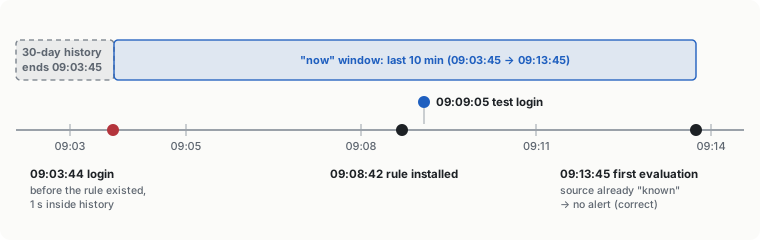
I tested again from an address it had never seen, and it worked.
If I hadn’t tested, the sudo rule would have looked fine forever without ever working. That’s the main thing I took from this: write the test at the same time as the rule, and run it after the rule is installed.
What’s next
- Get DNS queries into Loki, so I can alert on domains no device has visited before.
- Log blocked connections on the gateway, so the scan rule covers the whole network, not just my server.